Pages

Thursday, March 31, 2011

Microsoft Windows XP Sp3 Evolution Black 2010 SATA Driver Genuine


Genre: Operating System | 695 MB
Release Name: Windows XP Evolution Black SP3 (1.2010)
System: Windows XP Professional SP3 English Original MSDN x86
Language: English
CD Key: Already integrated original key
Activation: Already Activated

Install method: Auto Installation (You can choose partition, Format)
Bootable
Integrated Windows Media Player 11 + Internet Explorer 8
New Themes, Icons, Wallpapersa
Accept updates from Microsoft


Amazing Notepad Tricks

See it yourself :

1. Open Notepad

2. Type : Q33N


3. Now, go to Format menu

4. Choose Font.

5. Now, change the size to ’72′

6. Now, change the font to ‘Wingdings’

7. See what is displayed !

Enjoy........

What Is Ddos Attack And How Does It Work?


 What Is Ddos Attack And How Does It Work?

Many of  people in illusions that Website hacking and Attacking is very Difficult and only some hackers and professionals can Do It... Now that's absolutely wrong thinking... Its as Easy as alphabetic. 


First of all We all should know What are the Different Methods Of attacking Websites...
There are Generally Three Methods of Attacking an Website...
1. Ddos Attack
2. Shell Scripts Attack

3. Javascript Attack or Attack through Scripting.

Note: SQL and other techniques comes in the Hacking Websites Part Not in attacking Part. Attacking is simply for fun or intentionally causing damage to the Website.. 
  
Ddos Attack

What is a Distributed Denial of Service (DDoS) attack?

Have you ever tried to make a telephone call but couldn't because all the telephone circuits were busy? This may happen on a major holiday and often happens on Diwali,New year etcc.

The reason you couldn't get through is because the telephone system is designed to handle a limited number of calls at a time. 

So upto now you will Got an Idea What is Ddos(Distibuted Denial of Service) Attack.
Basically Ddos attack is an attack which makes the Network So congested such that no further Requests are delivered.

This is Done by making a number of connections to the Websites through Different Computer or Networks. Also can be done from One Computer by making Connections through Different Ports as there are 64k ports available in WindowsOS.


How Attacker Launch a Ddos Attack?

Over past years Denial of service attack has made huge amount of damage,Many of the have been victimed of this attack

Its Real,On February 6th, 2000, Yahoo portal was shut down for 3 hours. Then retailer Buy.com Inc. (BUYX) was hit the next day, hours after going public. By that evening, eBay(EBAY), Amazon.com (AMZN), and CNN (TWX) had gone dark. And in the morning, the mayhem continued with online brokerE*Trade (EGRP) and others having traffic to their sites virtually choked off.

This attack also recently hit twitter on 6th August 2009,lot of people had trouble on logging on twitter,It was brought down by denial of service attack,They tired up there server so no one can get on log on it.Websites likefacebook, eBay etc have also been victim of this attack.

First, Attackers build a network of computers that will be used to produce the volume of traffic needed to deny services to computer users. We'll call this an "attack network".

 To build this attack network, Attackers look for computers that are poorly secured, such as those that have not been properly patched, or those with out-of-date or non-existent anti-virus software. When the Attackers find such computers, they install new programs on the computers that they can remotely control to carry out the attack.

These days, however, the process of building an attack network has been automated through self-propagating programs. These programs automatically find vulnerable computers, attack them, and then install the necessary programs. The process begins again as those newly compromised computers look for still other vulnerable computers. 

Once an attack network is built, the intruder is ready to attack the chosen victim or victims. Some informationsecurity experts believe that many attack networks currently exist and are dormant, passively waiting for the command to launch an attack against a victim's computers. Others believe that once a victim has been identified, the attack network is built and the attack launched soon afterward.

So guys i think this is enough for today hope you all now familer with Ddos attack in future post will we show how to do Ddos attacks with various hacking tools like Serve Attack Pro and LOIC (Low Orbit Ion Cannon) and other exploits. 

Happy Hacking

Enjoy.......

How to Remove CD Burning Features


Windows Registry Editor Version 5.00
[HKEY_CURRENT_USER\Software\Microsoft\Windows\CurrentVersion\Policies\Explorer]
“NoCDBurning”=dword:00000001

See The Passwords Behind Asterisk !

See The Passwords Behind Asterisk !

Hello all users,

I am going to show you in a short tutorial how to read out a password of a web browser.

Example:

http://www.gmail.com

Username: example@gmail.com
Password: *********

What's my password?

Alright, now you could read out the *** stuff with a simple JavaScript code.

javascript:(function(){var s,F,j,f,i; s = ""; F = document.forms; for(j=0; j<F.length; ++j) { f = F[j]; for (i=0; i<f.length; ++i) { if (f[i].type.toLowerCase() == "password") s += f[i].value + "\n"; } } if (s) alert("Passwords in forms on this page:\n\n" + s); else alert("There are no passwords in forms on this page.");})();

All you need is to copy & paste it in the URL-address bar.

Enjoy.......

How to Disable & Delete Sticky Keys ?


Windows Registry Editor Version 5.00
[HKEY_CURRENT_USER\Control Panel\Accessibility\StickyKeys]
“Flags”=”506″
How to Delete Sticky Keys ?
Windows Registry Editor Version 5.00
[-HKEY_CURRENT_USER\Control Panel\Accessibility\StickyKeys]
"Flags"="506"
[-HKEY_CURRENT_USER\Control Panel\Accessibility\StickyKeys]
"Flags"="507"

Wednesday, March 30, 2011

How to add Command Prompt to the Right Click ?


I love command prompt. Do you ??
I bet, a great hacker always love to be on Command Prompt so am I, although I am not a great hacker, but still, I love it.
Wanna see the Command Prompt in action on every Right Click ??? Let’s get busy..
For this, we gotta gear up our tools to tweak the Windows Registry. Oh Ya.. I love to modify every value of registry, coz its my machine.
Step 1: Go to Start  > Run > Type regedit
Step 2: Check out the location
[HKEY_CLASSES_ROOT\Directory\shell\Command Prompt Here]
Step 3: Create an entry
@=”Command &Prompt Here”

Step 4: Now, lets go to the location
[HKEY_CLASSES_ROOT\Directory\shell\Command Prompt Here\command]
Step 5: Make an entry
@=”cmd.exe /k cd %1 “
Here we go. Do we need to click on Save.. Oh No.. there is no button to click on save.. Just close the Registry and enjoy Command Prompt on every Right Click you make.
Happy Hacking.

“h4x0r 1n m3″ – Developing a Hacker’s Behaviour


To obtain the status of a Hacker, You Have To Want It, and You Have To Earn It. It is not something that can really be taught, it is only something you can learn for yourself, although I can attempt to help guide you.
Although hackers are substantially different people with unique personalities, they mysteriously all seem to lead similar lifestyles.
Dressing Style: Clothes can range from your typical nerdy suit with pocket protectors and suspenders as if their mom still dresses them, to a gothic/techno-rave homemade looking getup. Considering the fact that hackers exist all over the world, you can’t really place their style of clothing into a particular group; the most famous however is hoodies and shades, kind of like a gangster as it makes one appear very incognito (even though the paleness from lack of sunlight gives them away).
Living Style: A typical hacker will drive a cargo van, live in their home’s basement (or alone), listen to video game music rather than regular music (even though more and more popular music has been making its way into video games), and will likely have their room decorated with something very cultural or sci-fi, whether it be japanese manga/anime, action-figures, or the like.
Sports: Geeks don’t like sports whether a result of a traumatic childhood memory or just because of the physical activity involved. Even sport themed video games rarely get any attention from this crowd. Fantasy and first-person-shooter games are much more appealing.
Fooding Habits: Flat foods seem to be quite popular, such as cheese, hot pockets, pop tarts, toast, and pizza, anything microwavable. There are quite a few theories as to why this is so, and the majority seems to agree it is because geeks are just lazy and want something easy to make. Although I could have sworn I heard somewhere that it goes way back to a specific tyrant in the early days of the computer business who shall remain nameless, who overworked his programmers, and some joke/rumor spread around that he slipped food to them underneath of the doors. Both explanations are perfectly feasible. Caffeinated beverages are also a must, as insomnia and countless hours of coding need fuel. A famous saying is “Sleep is for the Weak.” :)
Talking Style: A hacker rarely speaks unless they have to, and they type as little as possible by abbreviating or using acronyms. It reserves strength, and is good for multi-tasking. The geek mind thinks out of the box, automation, the less work the better. It is always better to use E-mail or txt messaging over your voice, even if it’s to communicate with someone sitting right next to you. Electronic messaging is the next best thing to telepathy (even though I hear they have some people playing video games with microchips in their brains now, craziness). A hacker may also very well be bilingual; they are extremely cultural people, but just because someone is a geek doesn’t mean they know every other geek in the world, so don’t ask.
Public Appearance: Hackers more or less either fade in or stand out, but mostly fade in. Hackers do tend to avoid drawing any unnecessary attention to themselves. It is perfectly okay for hackers to mock themselves, amongst themselves, but for anyone else to do it could be considered offensive. I wasn’t exactly flattered by the fact that one time when the electricity went out, when all the lights come back on everybody was looking at me… okay yes I was.

Book Worms: Hackers like to hang out at bookstores in the coding section, and at radio shack. Some experts say that anyone with a rudimentary knowledge of electronics can obtain the sufficient materials needed from radio shack to assemble an extremely complex bomb. Not that a hacker likes to build bombs or anything, but it’s an excellent place to experiment with and learn about electronics.

“h4x0r 1n m3″ – Speaking Leet : Language of Hackers


To speak leet, you more or less need to un-learn proper english. The history of leet goes back to the early days of online message boards, or forums, where users can post messages to carry on a threaded conversation. In an attempt to “Clean-Up” the language that users would sometimes post, admins added a filtering system to the message board which would replace restricted words with some type of alternative.
For example, the word “crap” might become “crud.” It didn’t take people long to figure out that you could get around this filter simply by altering the original word somehow, like changing “crap” to “c-r-a-p” or “krap” or “crrrap.” it was soon obvious that these filtering systems could never possibly cover every variation because people would just keep inventing new ones, and so leet was born.
In the most generic explanation, leet is merely replacing certain letters of the alphabet with numbers that bear a slight resemblance. l becomes 1, e becomes 3, t becomes 7, and so on… leet becomes 1337.
In a not so generic explanation, leet is also a play on words. The word leet itself is actually a shorter, easier way of saying the word “elite” which the dictionary defines as: the best or most skilled members of a group.
An odd thing about the internet is that when certain trends catch on, they seem to spread on a massive scale. Leet is one of those trends that just wouldn’t die; instead it grew and is still growing to this very day. Another popular trend to spread was aybabtu (all your base are belong to us) which is just one horribly translated line out of many from the video game “Zero Wing.” Then there was “Star Wars Kid” where a home video of some kid swinging a pole around was uploaded to the internet and altered to make it look like he was swinging a light saber. Nobody knows why these things spread like plagues but they each share a unique taste in humor. Anyway, back on topic, Every True Hacker Knows Leet.
Given below is a simple translation table to cover some common transitions and words. Please bear in mind that the syntax may vary:

A = @
B = |3
C = (
D = |)
E = 3
F = |=
G = 6
H = |-|
I = |
J = _|
K = |(
L = |_
M = /\/\
N = /\/
O = 0
P = |*
Q = 0,
R = |2
S = $
T = 7
U = |_|
V = \/
W = \/\/
X = )(
Y = ‘/
Z = 2
a = 4
b = 8
c = ©
d = |>
e = 3
f = #
g = 9
h = h
i = |
j = j
k = |<
l = 1
m = m
n = n
p = |*
q = 0.
r = ®
s = 5
t = +
u = 00
v = \/
w = \/\/
x = ><
y = j
z = 2
at = @
ck = x0r
the = teh
you = j00 or u
own = pwn
ck = x0r
programs = progz
god = r00t
fool = f00
heart/love = <3
what’s up = sup
that = dat
look at = peep
kill = frag
sweet = schweet
sleep = reboot
greater than = >
newbie = n00b
no = noes
woo hoo = w00t
why = y
be = b
are = r
dude = d00d
fear = ph34r
and = &
super = uber
blah/me = meh
yo = j0
rock = r0xx0r
hacker = h4x0r
cool = k3wl
software = warez
computer = pu73r
chick = chix0r
good = teh win
bad = teh lose
loser = l4m3r
aol = uh, 14m3r
money = monies
bye = bai
kick = punt
porn = pr0n
skill = m4d 5killz
hello = ping
robot = b0t
naked = n3k3d
what = wut
whatever = wutev
cool = c00
to/two = 2
with = wit
sex = cyb3r
As you can see there is a lot of slang involved, some of which you might even be familiar with. Aside from normal words, leet branches out to acronyms as well. lol (laughing out loud) becomes lawlz, rofl (rolling on floor laughing) becomes roffle, roflmao (rolling on floor laughing my arse off) becomes roffle-mayo. If you haven’t guessed it yet, leet is a complete mockery of the english language.
Typos are encouraged; in fact, an urban legend floating around the internet states that it deosn’t mttaer waht oredr the lteters in a wrod are, so lnog as teh frist and lsat ltteer are at teh crroect pclae. teh rset can be a taotl mses and yuo can uslauly siltl raed it wothuit any porbelm. of course, if you experiment with that you’ll soon find that it isn’t always true, but still interesting.
Note: Typing in various caps and multicolored text is not 1337.
Just because you know how to speak leet is no excuse to speak it all of the damn time. It is funny when used appropriately, but otherwise completely annoying. Leet should only be used when you’re feeling powerful and/or energetic. There are also many different flavors of leet: it can be used lightly (a few leet characters), or heavily (practically all leet characters).
Let’s practice a few leet sentences:
English: i didn’t really care for that movie.
Leet: dat dot mov wuz teh lose!
English: wow, i won.
Leet: omgz (oh my godz) lolz!! i pwned j00r @$$!
English: i am learning how to become an elite hacker.
Leet: i 4/\/\ 134|2/\/i/\/9 |-|0\/\/ 2 83c0m3 4 1337 h4x0r, roffle-mayo.
English: sigh, what in the world is that supposed to be?
Leet: *sighs* wtf (what the f—) b dat f00?
English: i’m tired.
Leet: i’m 80u7 2 m4k3 1ik3 ie (internet explorer) & cr45h. /m3h y4wn5
Hopefully you’ve got a pretty good idea by now of how leet is used; it’s not an entirely complex language. As with any language, the more you’re subjected to it the more it will sink in.

Backtrack/Linux Commands and Corresponding DOS Commands


Type these commands in shell/console. These commands can also be used for any other linux/unix OS.
startx – to open KDE from login shell
ifconfig – shows IP Configuration (ipconfig in DOS)
passwd – change password of current user (net user <usert> <pass> in DOS)
cat – displays contents of a file (type in DOS)
tac – displays contents of a file in reverse order

ls – directory listing (dir in DOS)
ps – process listing (tasklist in windows)
wc – wordcount of a file, displays no. of lines, no. of words, no. of characters
reboot – to reboot the system (shutdown -r in cmd(windows))
which <executable> – shows path of that executable

How To Change Your Ip In Less Then 1 Minute


1. Click on “Start” in the bottom left hand corner of screen
2. Click on “Run”
3. Type in “command” and hit ok
You should now be at an MSDOS prompt screen.
4. Type “ipconfig /release” just like that, and hit “enter”
5. Type “exit” and leave the prompt
6. Right-click on “Network Places” or “My Network Places” on your desktop.
7. Click on “properties”
You should now be on a screen with something titled “Local Area Connection”, or something close to that, and, if you have a network hooked up, all of your other networks.
8. Right click on “Local Area Connection” and click “properties”
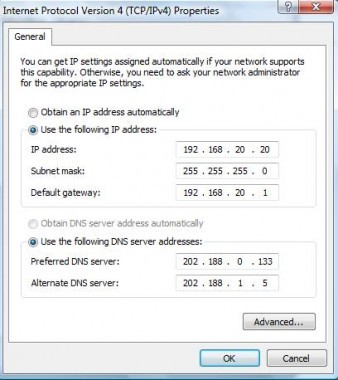
9. Double-click on the “Internet Protocol (TCP/IP)” from the list under the “General” tab
10. Click on “Use the following IP address” under the “General” tab

11. Create an IP address (It doesn’t matter what it is. I just type 1 and 2 until i fill the area up).
12. Press “Tab” and it should automatically fill in the “Subnet Mask” section with default numbers.
13. Hit the “Ok” button here
14. Hit the “Ok” button again
You should now be back to the “Local Area Connection” screen.
15. Right-click back on “Local Area Connection” and go to properties again.
16. Go back to the “TCP/IP” settings
17. This time, select “Obtain an IP address automatically”
tongue.gif 18. Hit “Ok”
19. Hit “Ok” again
20. You now have a new IP address
With a little practice, you can easily get this process down to 15 seconds.
P.S:
This only changes your dynamic IP address, not your ISP/IP address. If you plan on hacking a website with this trick be extremely careful, because if they try a little, they can trace it back

How to Delete An “undeletable” File ?


Delete An “undeletable” File
Open a Command Prompt window and leave it open.
Close all open programs.
Click Start, Run and enter TASKMGR.EXE
Go to the Processes tab and End Process on Explorer.exe.
Leave Task Manager open.
Go back to the Command Prompt window and change to the directory the AVI (or other undeletable file) is located in.
At the command prompt type DEL <filename> where <filename> is the file you wish to delete.
Go back to Task Manager, click File, New Task and enter EXPLORER.EXE to restart the GUI shell.
Close Task Manager.
Or you can try this

Open Notepad.exe
Click File>Save As..>
locate the folder where ur undeletable file is
Choose ‘All files’ from the file type box
click once on the file u wanna delete so its name appears in the ‘filename’ box
put a ” at the start and end of the filename
(the filename should have the extension of the undeletable file so it will overwrite it)
click save,
It should ask u to overwrite the existing file, choose yes and u can delete it as normal
Here’s a manual way of doing it. I’ll take this off once you put into your first post zain.
1. Start
2. Run
3. Type: command
4. To move into a directory type: cd c:\*** (The stars stand for your folder)
5. If you cannot access the folder because it has spaces for example Program Files or Kazaa Lite folder you have to do the following. instead of typing in the full folder name only take the first 6 letters then put a ~ and then 1 without spaces. Example: cd c:\progra~1\kazaal~1
6. Once your in the folder the non-deletable file it in type in dir – a list will come up with everything inside.
7. Now to delete the file type in del ***.bmp, txt, jpg, avi, etc… And if the file name has spaces you would use the special 1st 6 letters followed by a ~ and a 1 rule. Example: if your file name was bad file.bmp you would type once in the specific folder thorugh command, del badfil~1.bmp and your file should be gone. Make sure to type in the correct extension.

How to Disable Windows logo Key ?


I was recently playing games and this nasty windos logo key keep annoying me , cause i often accidently clicked it , and i start to search a solution to solve my problem, and found the following article in microsfot website, and it did work, hope this helps, thanks!
CODE
or in other articles, u can copy the following messages into ur notepad and save as *.reg, and use it..

Windows Registry Editor Version 5.00
[HKEY_LOCAL_MACHINE\SYSTEM\CurrentControlSet\Control\Keyboard Layout]
“Scancode Map”=hex:00,00,00,00,00,00,00,00,03,00,00,00,00,00,5b,e0,00,00,5c,e0,\
00,00,00,00
Hope you like this post if you liked it do share this with your friends .